TLDR
- 10+ new techniques have been added
- MCP server support
- New payloads including PIC templates and C2 agents
- Extended Markdown support
- Miscellaneous UI improvements
Update Summary
Version 1.2 “Metal Claw” has arrived! This update focuses on making Combat Theater more flexible for detection engineers and security researchers, with a particular emphasis on AI integrations, shellcode variety and quality of life improvements.
The biggest addition is our new MCP server, which allows you to connect Combat Theater to your LLM of choice and use natural language to configure and execute techniques, build playbooks, and more.
We’ve also greatly expanded our payload library with new shellcode variations and precompiled C2 agents, introduced a new category of challenge playbooks and made several improvements to the UI.
MCP & AI Integrations
The star of the show this update is our new Model Context Protocol (MCP) server, which allows your LLM to seamlessly integrate with and take control of Combat Theater. It’s built in TypeScript and can be installed with essentially any LLM harness. Once connected, it can perform technique execution and customisation, build playbooks, and export or ingest the output.
This enables new workflows:
- Threat Intelligence to Playbook: Feed your LLM a threat intelligence report or PDF and ask it to identify which techniques are supported by Combat Theater. From there it can put together a playbook and then execute it.
- Perform Log Analysis: After executing a technique, ask your LLM to review the execution logs and suggest potential detection opportunities or areas worth investigating.
- Purple Teaming: Build out a purple team exercise conversationally, then have your LLM configure and execute the relevant techniques using Combat Theater.
These are only a few examples. Since MCP provides a standardised way for your LLM to interact with external tools, there’s plenty of room to get creative with how you integrate Combat Theater into your existing workflows.
More Payload Variations & Precompiled C2 Agents
We’ve continued expanding our payload library with a particular focus on making it easier to test how different payload implementations affect telemetry visibility and detection.
One of our users has been using Combat Theater to evaluate a shellcode detection system and requested additional precompiled variants of our existing test payloads. In response, we’ve greatly expanded our shellcode offerings.
New PIC Templates
We’ve compiled variants of our test payloads using several popular position-independent shellcode (PIC) templates:
- Stardust
- Crystal Palace
- Donut
- Our own in-house PIC template
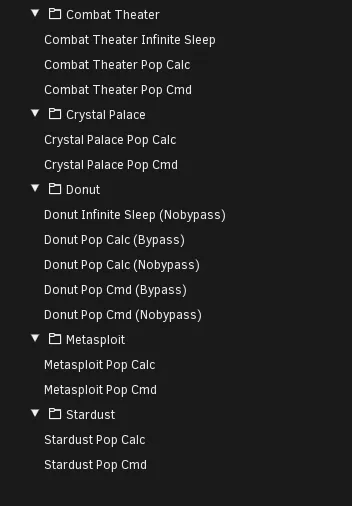
These variations provide researchers with a convenient way to compare how different shellcode implementations behave under the same injection conditions without having to manually compile each one, ideal for testing shellcode execution prevention systems.
Precompiled C2 Agents
Previously, researchers wanting to quickly test against C2 agents would need to spin up a Kali machine, install the C2, configure and execute the team server, launch the client, compile the agent, transfer it to the test machine and then finally execute it. While this is standard activity for red teamers, it can be very time-consuming for researchers just looking to get an agent in memory as fast as possible.
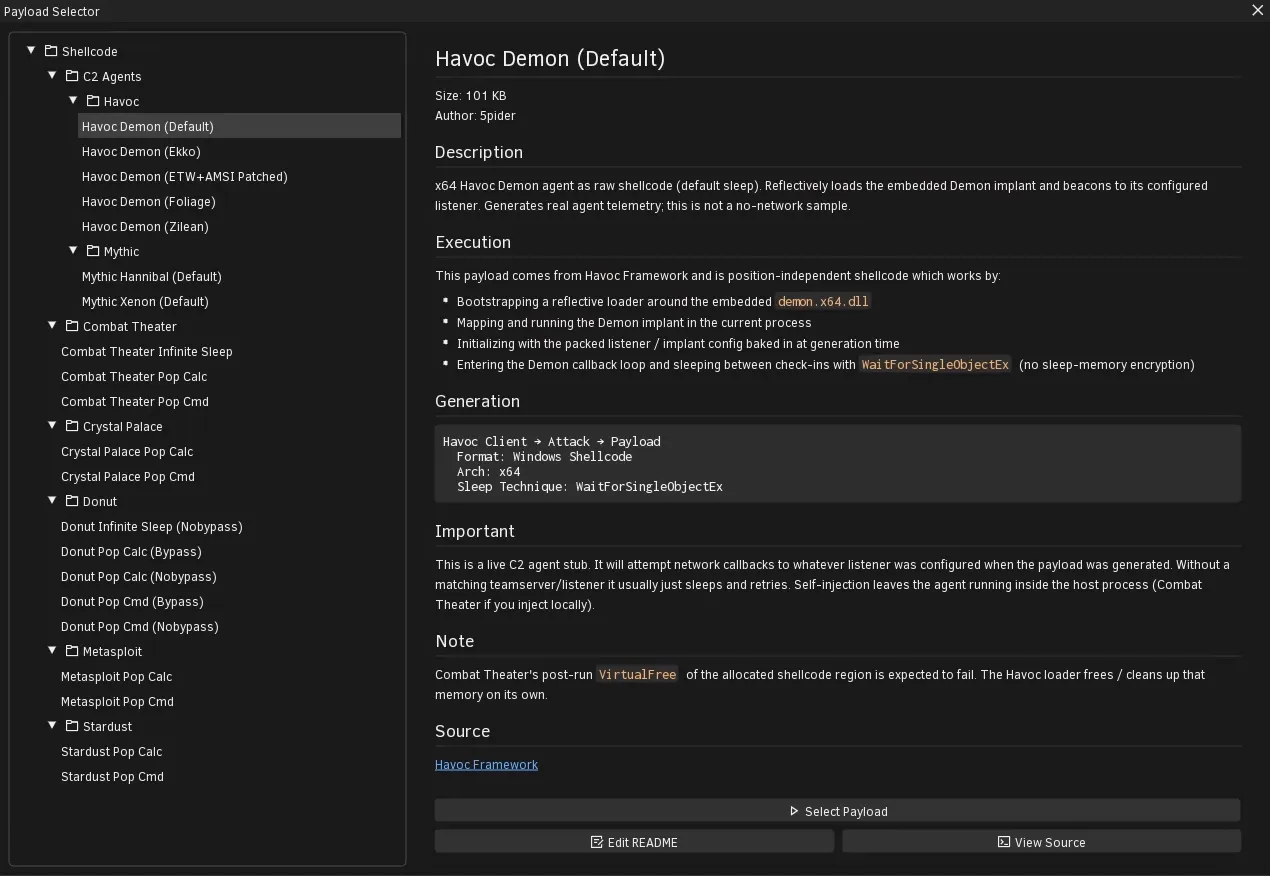
So in this update, we’ve added a selection of precompiled agents from popular open-source C2 frameworks where their respective licences permit redistribution.
For safety and peace of mind, the bundled agents are preconfigured with their C2 domain addresses pointing to localhost rather than an external server. This avoids the default configurations attempting to make outbound network connections.
These additions should be particularly useful for researchers evaluating sleep obfuscation detection, as we’ve bundled multiple variants of agents using different techniques to sleep.
New Techniques & Playbooks
As with every release, we’ve continued expanding our technique library. Metal Claw adds more than 10 new techniques alongside improvements and fixes to several existing ones. To highlight the main additions:
Module Stomping
We’ve added multiple new module stomping variations to our technique library.
Module stomping is a technique where malware writes a payload into the memory space of a legitimate loaded module and then executes it. We previously explored this technique in depth in our module stomping blog post, and these new additions make it easier to reproduce and compare different implementations.
AMSI & ETW Patching
We’ve also extended our Defence Evasion category with additional support for patching the Antimalware Scan Interface (AMSI) and Event Tracing for Windows (ETW).
Alongside the new patching functionality, we’ve added status buttons that allow you to quickly check the current patch state and revert the patches with a single click.
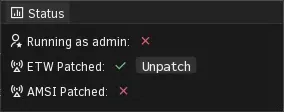
This makes it much more convenient to experiment with different patching methods and return the test environment to its original state between runs.
Introducing Challenge Playbooks
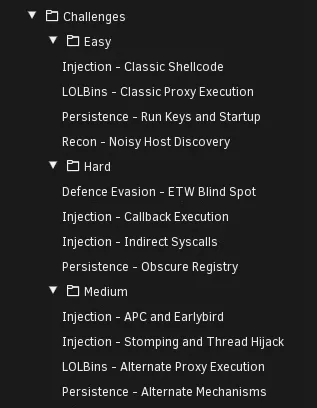
We’ve introduced a new playbook category called Challenge.
Unlike our existing APT and Criminal playbooks which focus on emulating behaviours associated with particular threat actors or malware families, Challenge playbooks are designed specifically for evaluating endpoint detection capabilities.
Each challenge contains a collection of techniques grouped by their expected difficulty to detect, allowing researchers to quickly assess different areas of an endpoint detection product.
These playbooks are particularly useful for:
- Rapidly assessing the detection capabilities of an EDR product
- Comparing detection coverage between different endpoint security products
- Identifying potential gaps in an existing detection stack
- Running repeatable tests after detection content or product updates
The goal is to provide a convenient starting point for detection testing without requiring users to manually assemble a collection of techniques every time.
Of course, the difficulty of detecting a technique depends heavily on the product, its configuration and the detections in place. Our Challenge playbooks are intended as practical testing aids rather than definitive measures of a product’s effectiveness.
Additional Changes
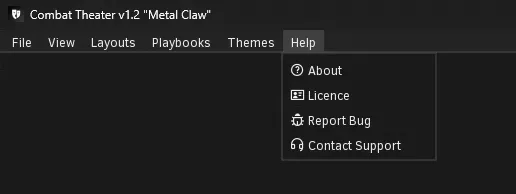
Revamped Menu Bar
The menu bar has been tweaked and some previously tucked-away buttons have been moved into clearer locations.
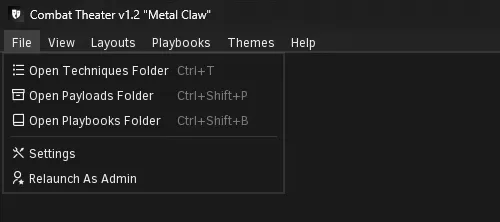
Added Keybinds
Requested by one of our users, we’ve added dedicated keybinds for quickly opening the common resource folders.
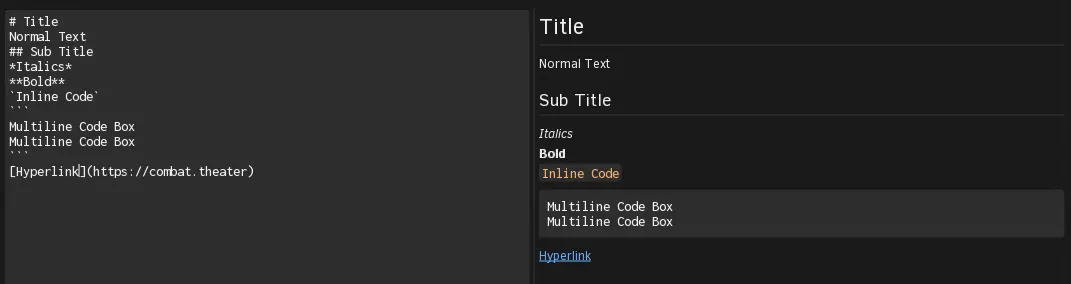
Extended Markdown Support
Our built-in Markdown renderer has received a substantial upgrade.
Previously, Markdown rendering was limited to basic headings and regular text. While this was sufficient for simpler readme files, it wasn’t ideal for more detailed technical documentation.
The updated renderer now supports a much wider range of formatting:
- Multi-line code blocks
- Inline code
- Improved hyperlinks
- Bold and italic text
This makes it much easier to write detailed documentation for techniques, payloads and playbooks while keeping everything readable directly within Combat Theater.
Better Log Management
You can now select individual text in the log window, where previously you couldn’t. We’ve also removed the menu bar and moved the actions into a right-click menu.